
 Factorial · Job Catalog
The structure behind HR automation
HR teams repeated setup across products for every new employee. I led the design of Job Catalog, a shared job structure that lets an employee’s role and level drive those assignments.
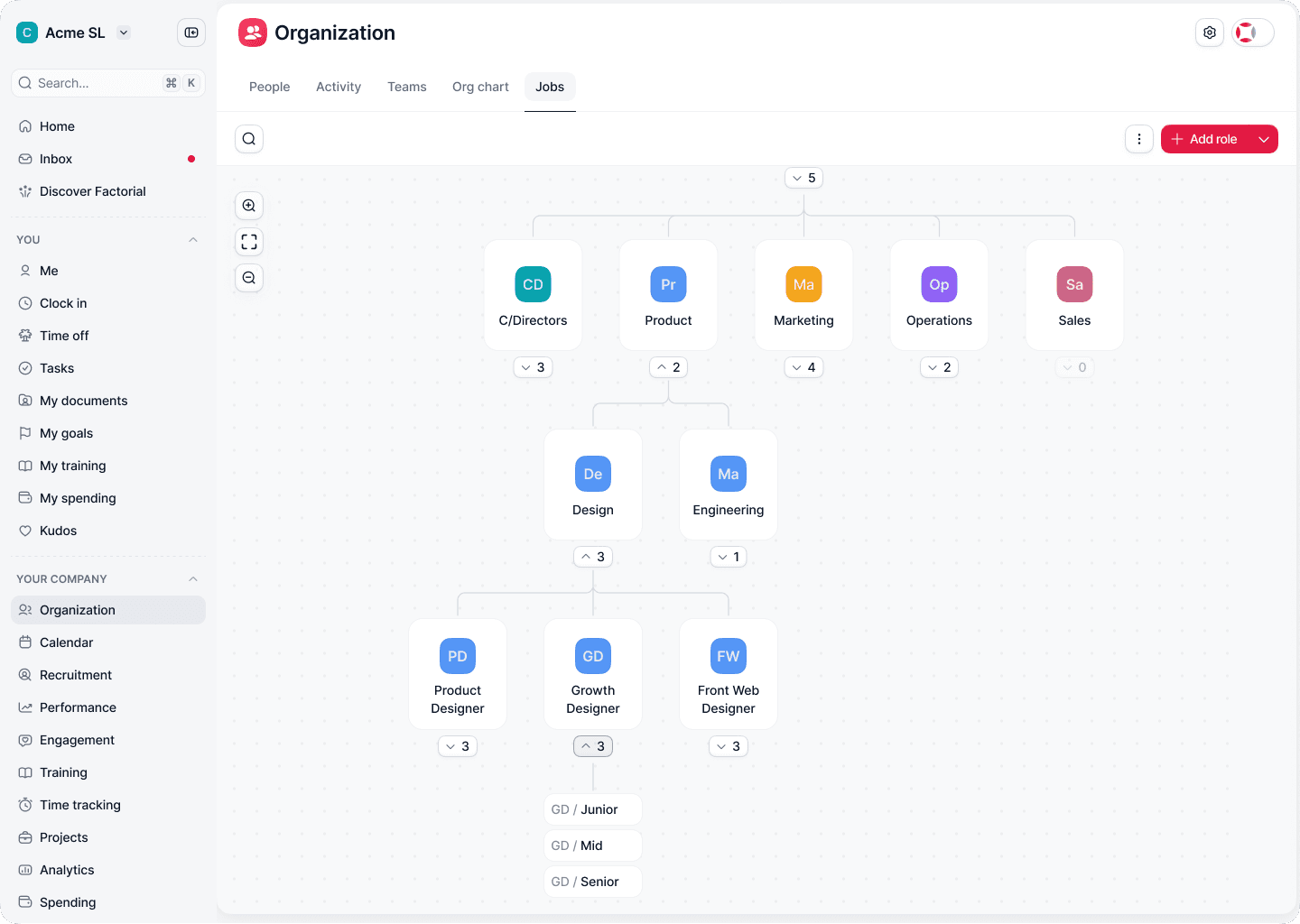
The structure had outgrown the product
As Factorial moved into larger organisations, its model could no longer consistently represent their job architectures, competencies and career frameworks. HR teams configured related information across several parts of the product. That work grew with headcount.
I worked with Product and Engineering to connect how companies described their organisation with how the platform represented it. Workshops, customer interviews and support insights exposed the gaps: real structures were difficult to represent, and recurring setup depended on manual work.
The design needed to support several HR products, preserve the flexibility larger companies required, and make the consequences of a configuration change understandable.
Give different products one job structure
The Job Catalog became a three-level model: Families → Functions → Roles. A family contains functions, and each function contains roles. Conditions defined higher in the hierarchy can apply to the roles beneath them, including roles created later.
This gave other Factorial domains a common reference for their own assignments. A role could connect working conditions, competencies, devices and salary information across the platform.
The model was only useful if HR admins could understand how to configure it and what would happen when it changed. That shaped the interaction design.
Make inherited rules understandable
Inheritance removes repeated configuration, but introduces a different kind of complexity: where did this value come from, and who would be affected if it changed?
Keep the graph in view
I brought working conditions, salary information, competencies and devices into a side panel. Admins could inspect a node’s configuration while keeping its place in the hierarchy visible.
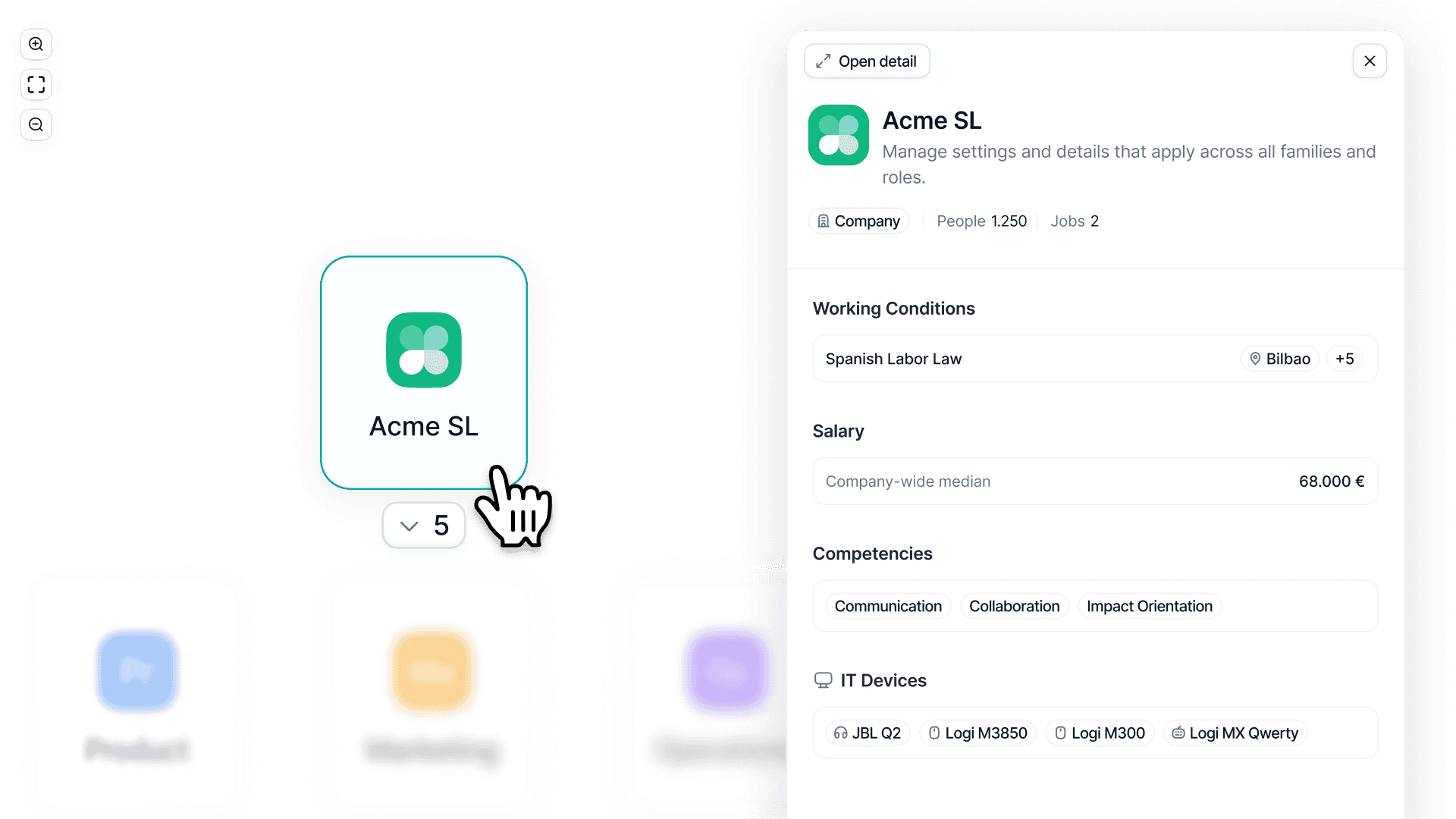
The side panel connects a node’s place in the structure with the configuration it carries.
Show the source beside the value
Inherited values use a link indicator with source information. For example, a competency in a role can identify the family it comes from. People counts and role context help admins understand the reach of that configuration.
Give detailed configuration its own space
The full-page experience separates configuration from people analytics. Admins can work through levels, working conditions, competencies, salaries and equipment, then inspect the people connected to the role.
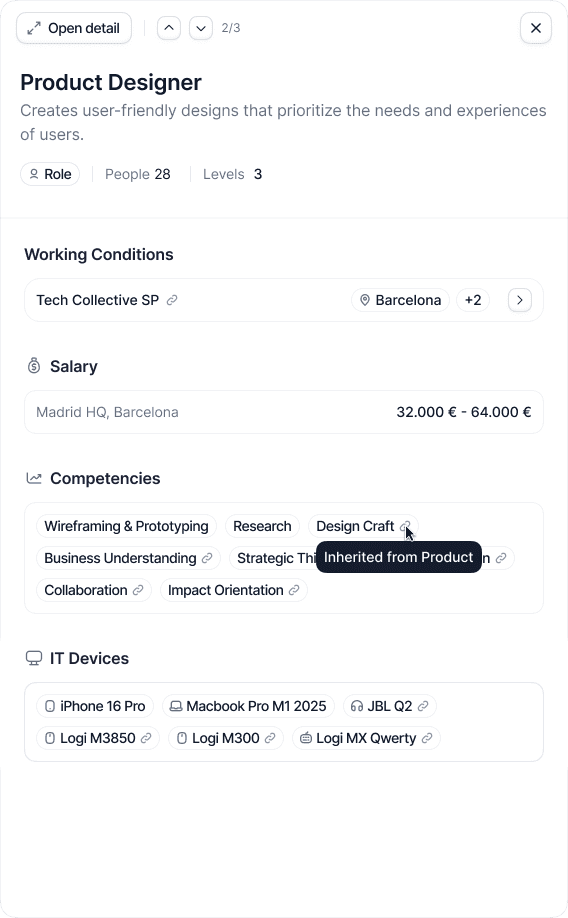
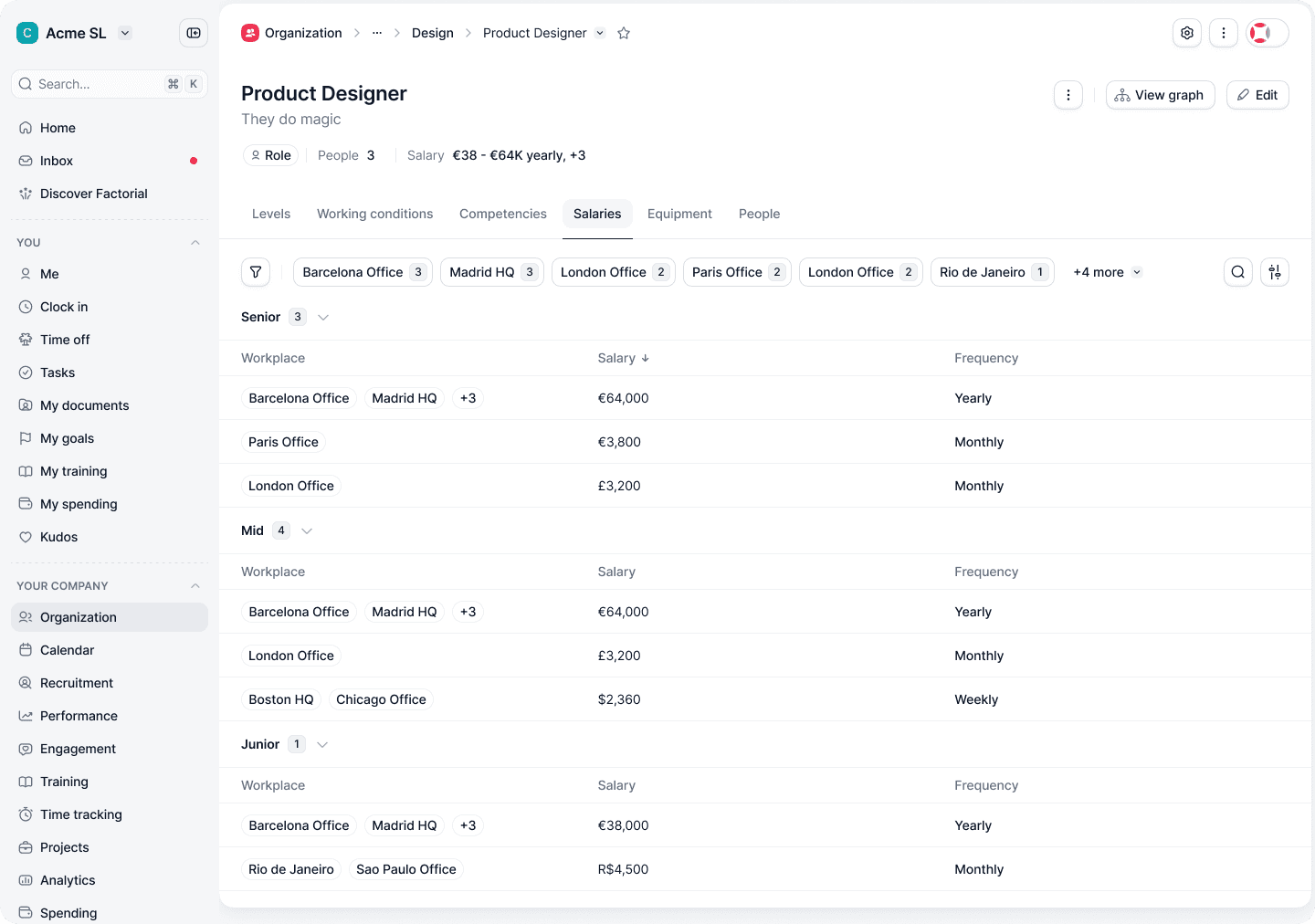
Source information in the side panel; detailed salary configuration by level and workplace.
Change what happens when a new employee joins
Earlier, HR created the employee profile and then repeated the setup across domains: choosing the contract type, completing contract fields, configuring working hours and holiday conditions, setting days and hours per week, entering salary information, assigning devices and defining expected competencies.
With Job Catalog, HR creates the profile, chooses the contract type, and assigns a role and level. That selection drives the automatic assignment of contract fields, working conditions, devices, expected competencies, and salary—a range or fixed amount depending on the selected level.
Contract type remains a manual choice. The catalog reduces repeated configuration by applying the assignments already associated with the role and level.
The beta exposed a gap in the mental model
Twenty-eight client companies participated in the beta and shared feedback throughout development. Alongside positive feedback, their use of the catalog exposed places where the structure and its explanation were difficult to understand.
One failure appeared during CSV import. Some users skipped parent rows because they expected Factorial to infer the hierarchy. An error message could identify a missing row, but it would not explain why the parent was necessary.
We introduced a contextual guide alongside the graph: understand the tree, create a family, add functions and roles, then configure conditions. The guide taught the model in the order people needed to build it.
Let the structure change with the organisation
Beta feedback also showed the importance of reorganising an existing catalog. We added drag and drop so admins could move nodes between families and functions without rebuilding the structure.
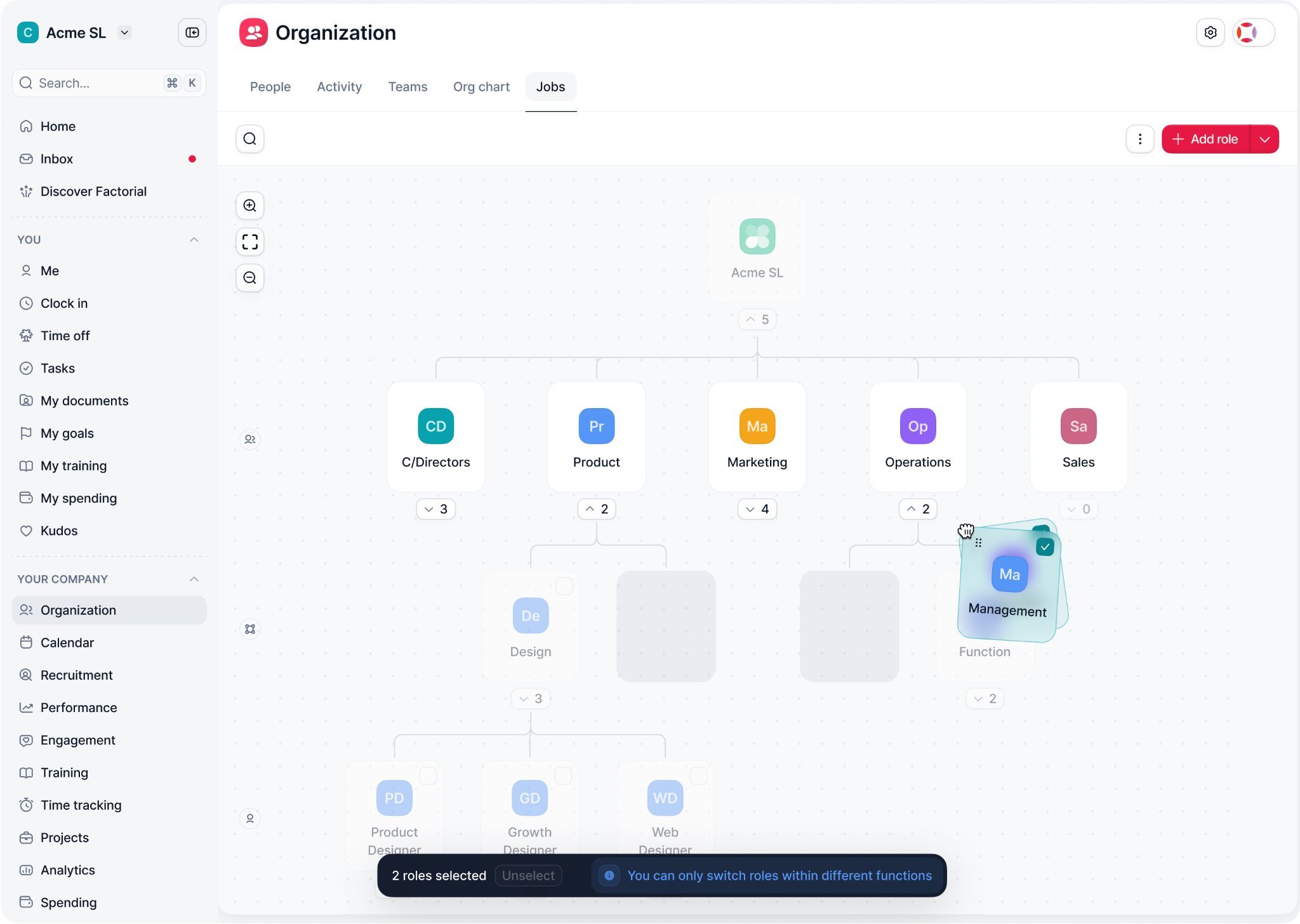
Reorganising the catalog by moving a function within the graph.
A shared foundation for automation
The Job Catalog enabled at least five other Factorial domains to use a shared abstraction for automatic assignments. The result reached beyond the catalog itself: an employee’s role and level could now supply information that previously required repeated manual setup.
This reduced the work involved in onboarding new employees. We did not measure the time saved, so the evidence here is the capability delivered, the assignments it automated, and the feedback gathered during the 28-company beta.
The trade-off: structure has a setup cost
The three-level hierarchy fits larger organisations with formal job architectures. Smaller companies may spend more time building that structure than they save through automation.
A simpler setup mode is the next opportunity: give those companies access to useful automation with less initial configuration.
My takeaway is that shared rules need a clear explanation of their source and reach. The graph, side panel and setup guide each helped make that underlying logic easier to understand and use.